Athea: A Romantic Script Font for Web Design
As a web designer, I’m always on the lookout for fonts that bring personality and visual interest to digital projects. Athea caught my eye with its soft, flowing strokes and feminine energy. I tested it across several website layouts, from hero sections to call-to-action buttons, and found it to be a versatile addition to any creative project.
Athea’s Visual Personality and Digital Appeal
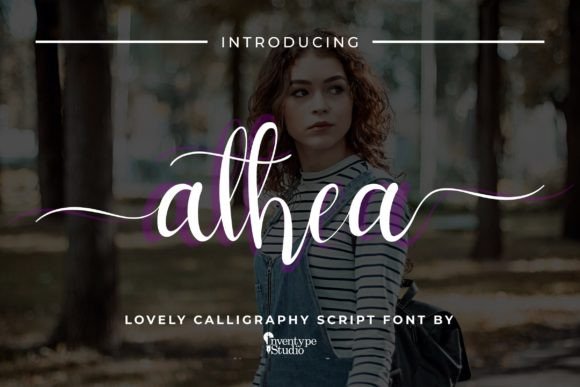
Athea is a modern calligraphy script font that feels both elegant and approachable. Its curves are smooth and consistent, making it ideal for headers, logos, and decorative elements. The font has a warm, handwritten quality that adds a personal touch without being too ornate. It’s perfect for websites that want to feel inviting and artistic, like boutique online stores, creative portfolios, or coaching sites.
One of the things I love about Athea is how it balances style with legibility. Even when used in larger sizes, it maintains clarity and doesn’t lose its charm. This makes it great for headlines, banners, and section titles where visual impact matters.
Using Athea in Website Headers and Hero Sections
I first tried Athea in a hero section for a small business website. The client wanted something that felt fresh and romantic, and Athea delivered. I paired it with a clean sans serif font for the body text, which created a nice contrast. The result was a layout that felt modern yet expressive.
On mobile devices, Athea scaled well and remained readable. I noticed that it looked especially good over image backgrounds, where its delicate strokes stood out without competing with the visuals. For a product landing page, this could be a great way to highlight key messages or brand values.
Athea in Call-to-Action Areas and Buttons
When I used Athea for call-to-action buttons, I had to be careful with the size and spacing. While it works well for short phrases, it can become less readable if the text is too small or cramped. That said, when used thoughtfully, it adds a stylish touch to buttons and links, especially for sites that prioritize aesthetics over pure functionality.
For example, on a course sales page, I used Athea for the headline and subheadline, while keeping the button text in a simpler font. This allowed the decorative elements to shine without overwhelming the user experience.
Pairing Athea with Other Fonts for Web Design
Font pairing is essential in web design, and Athea pairs beautifully with a range of other typefaces. I found that it worked particularly well with a clean sans serif font for body copy, creating a balanced and professional look. It also complemented a simple serif font for a more editorial feel, which could be useful for blog headers or content sections.
For a more playful vibe, I experimented with pairing Athea with a handwritten font. The combination added depth and character, making the design feel more dynamic. However, I made sure not to overdo it—too many decorative fonts can make a site feel cluttered.
Readability and Responsive Design Considerations
Readability is crucial for any web font, and Athea performs well in most scenarios. On desktop screens, it looks crisp and refined. On smaller devices, I noticed that the font needed a bit more space to maintain clarity. That’s why I recommend using it for short phrases or headings rather than long paragraphs.
When testing on dark backgrounds, Athea held up nicely, but I found that light backgrounds made the strokes appear slightly bolder. This is something to keep in mind when designing for different color schemes. Also, when using Athea over images, it’s best to add a subtle overlay or background to ensure the text remains legible.
Best Uses for Athea in Web Projects
Athea shines in areas where visual appeal is important. It’s ideal for headers, logos, and decorative accents. I’ve used it successfully on portfolio sites, creative shop pages, and promotional landing pages. Its feminine flair makes it a great choice for brands targeting a more artistic or lifestyle-oriented audience.
It also works well for digital ads and social media graphics, where a unique font can help stand out. However, I wouldn’t recommend using it for long-form content or technical interfaces. For those cases, a more functional font would be better suited.
Before implementing Athea in a project, I always check the available styles, weights, and file formats. It’s important to make sure the font is properly licensed for commercial use, especially if you’re working on a client’s site or an online store.